These guides cover running a node and a validator on Gnosis Chain as it runs today, and stay valid until the fork. At activation the validator set retires and nodes keep only an execution client. See the move to Gnosis EEZ.
Managing an existing validator? Go to Validator withdrawals or Voluntary exit.
Eth-docker
Eth-docker is a docker automation project for Ethereum consensus and execution clients. It aims to make running a Ethereum staking full node simpler than setting everything up manually, while allowing the user choice when it comes to the exact client mix they wish to run.
Eth-docker allows user to set up Gnosis clients by answering simple dialog-based questions on terminal.
References
- Eth-docker Docs: https://eth-docker.net/
- Github: https://github.com/ethstaker/eth-docker
Prerequisite
- Ensure compatible hardware requirements for different clients.
- Configure the server(optional)
Step 1: Install
This demo has been tested on Ubuntu 20.04/22.04 and Debian11/12.
Open a new terminal, copy and paste the command below.
Download eth-docker
cd ~ && git clone https://github.com/ethstaker/eth-docker.git && cd eth-docker
Install pre-requisites such as Docker
./ethd install
Step 2: Configure and execute clients
Configure eth-docker - have an Gnosis address handy where you want Execution Layer rewards to go
./ethd config
- Select Network: Gnosis Chain
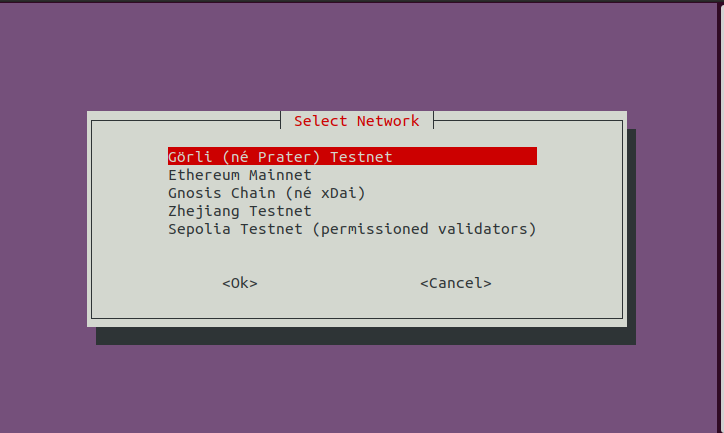
- Select deployment type: Ethereum node or Ethereum RPC node, choose Ethereum node if you want to run consensus, execution and validator client.
- Select consensus client: Lighthouse, Teku, or Nimbus.
- Select execution client: Nethermind, or Erigon.
- Select checkpoint sync: Choose Yes if you want to use CL rapid sync with remote checkpoint.
- Configure checkpoint consensus client: paste the checkpoint URL from https://checkpoint.gnosischain.com.
- Select MEV Boost
- Select Grafana dashboard
- Configure Graffiti: Enter the graffiti for your validator.
The Configuration will now be built.
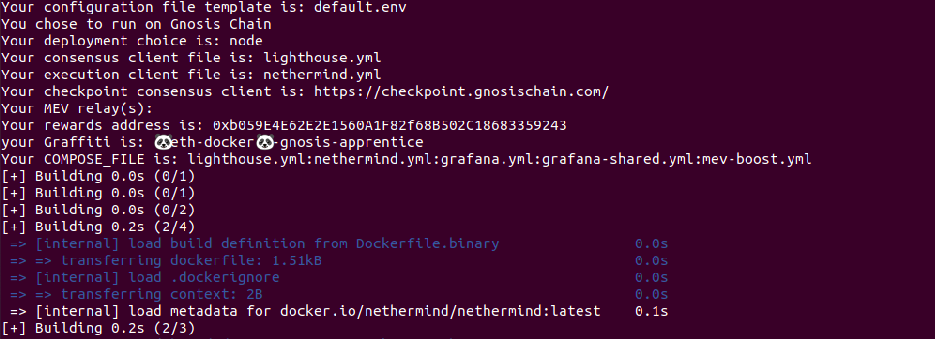
Once the building part is done, start eth-docker by running
./ethd up
Check that execution/consensus client running correctly by running:
- Execution
- Consensus
- Validator
./ethd logs -f execution
./ethd logs -f consensus
./ethd logs -f validator
Step 3: Run a validator
You can either create validator key(s) from eth-docker or import the validator key(s) that are generated from validator-data-generator.
For the second option, please refer to Interactive Guide: Generate validator keys.
Import the key(s) by specifying the path to keystore file (folder where you keep the keystore-m.json file).
./ethd keys import --path PATH_OF_KEYS
Check that the key is imported by running
./ethd keys list
Step 4: Deposit for validator
Once the execution and consensus clients are fully synced, you may proceed to deposit for validator.